Skip to content
PatentBrief
Get alertsTop ↑

How Smartphones Suggest and Correct Words While You Type

Apple's patent on a system that displays word suggestions above a touchscreen keyboard, allowing users to accept or reject them with simple taps or keystrokes.

Granted 2011ActiveExpires 2027Owned by Apple IncInvented by Bas Ording, Kenneth Kocienda

Original patent title: “Method, system, and graphical user interface for providing word recommendations

Plain-English explanation by SahiLast reviewed · June 15, 2026

Apple's patent on a system that displays word suggestions above a touchscreen keyboard, allowing users to accept or reject them with simple taps or keystrokes. Granted to Apple Inc in 2011 with 48 claims and 58 forward citations.

Coverage

What does this patent actually cover?

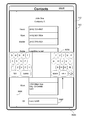
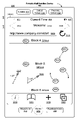
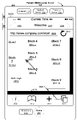
This patent describes a method for managing text input on a touchscreen device. As a user types in one area of the screen, the device displays a suggested correction or completion in a separate area located between the text field and the keyboard. The system allows the user to accept the suggestion by tapping it or pressing a delimiter key like the space bar. Conversely, the user can reject the suggestion and keep their original text by tapping the original word in that same suggestion area. This creates a fluid interaction loop that balances speed with user control.

The gap

What does this patent NOT cover?

  • Does not cover predictive text systems that automatically replace words without a user-initiated gesture or delimiter key.
  • Does not cover text correction systems that operate entirely in the background without a dedicated suggestion display area.
  • Does not cover voice-to-text input methods.
  • Does not cover hardware-based predictive text systems that lack a touchscreen interface.

These exclusions are unique to PatentBrief — derived from the actual claim language, not patent-office boilerplate.

Key facts

Patent numberUS 8074172
StatusActive
FieldConsumer Electronics
AssigneeApple Inc
InventorsBas Ording, Kenneth Kocienda
Filed2007
Granted2011
Claims48
Times cited58
LitigationNone on record
Value · $86K$276KModest

What made this novel

The patent cleverly treats the suggestion bar as a two-way interface: one side offers the 'fix' and the other side acts as a 'keep my original' button, giving the user equal, immediate control over both choices.

Method, system, and graphical …(Primary claim)consumer electronicssoftware

Schematic visualization of the patent's claim structure. Hand-drawn diagrams in progress for each landmark patent.

Where you've seen this

Real-world examples

01

iOS QuickType keyboard

02

Android Gboard suggestion bar

03

Most modern smartphone virtual keyboards

Why it matters

The bigger picture

This technology became a fundamental part of the mobile experience, appearing in the original iPhone and subsequent iOS versions. It addressed the core frustration of typing on small glass screens by providing a clear, interactive way to fix typos without navigating complex menus. It set the standard for how modern mobile operating systems handle text input.

Filed

January 5, 2007

Granted

December 6, 2011

Market context

Who's building on this

Companies in this space

Apple continues to refine this mechanism within iOS, while Google has built extensive machine learning models on top of this basic interaction pattern for Gboard. These companies dominate the space by integrating these UI patterns with increasingly sophisticated language models.

Market impact

This patent helped define the user experience for the first generation of mass-market smartphones, making touch-based typing viable for general consumers. It essentially codified the 'suggestion bar' UI pattern that is now present on virtually every mobile device globally.

Claim 1 — Plain English

What this patent covers

This patent describes a method for managing text input on a touchscreen device. As a user types in one area of the screen, the device displays a suggested correction or completion in a separate area located between the text field and the keyboard. The system allows the user to accept the suggestion by tapping it or pressing a delimiter key like the space bar. Conversely, the user can reject the suggestion and keep their original text by tapping the original word in that same suggestion area. This creates a fluid interaction loop that balances speed with user control.

The clever bit

The patent cleverly treats the suggestion bar as a two-way interface: one side offers the 'fix' and the other side acts as a 'keep my original' button, giving the user equal, immediate control over both choices.

What it does not cover

  • Does not cover predictive text systems that automatically replace words without a user-initiated gesture or delimiter key.
  • Does not cover text correction systems that operate entirely in the background without a dedicated suggestion display area.
  • Does not cover voice-to-text input methods.
  • Does not cover hardware-based predictive text systems that lack a touchscreen interface.

Patent timeline

Filing

Application submitted to the patent office

Publication

Application published, typically 18 months after filing

Grant

Patent officially issued

PatentBrief Score

Impact Score

High impact

Citation count

35/40

Highly cited

Claim breadth

20/20

Very broad protection

Recency

5/20

Granted 10–20 years ago

Assignee scale

20/20

Major company or institution

PatentBrief Impact Score — based on citation count, claim breadth, recency, and assignee scale. Not a legal assessment.

Heuristic Value Estimate

What this patent might be worth

Modest

$86K$276K

Midpoint $173K · expired or expiring · industry ×1.6

Adjust inputs →

Heuristic only — blends forward/backward citation counts, claim scope, time remaining, litigation history, and CPC-derived industry baseline. Real valuations need a professional appraisal.

Patent Claims

0 independent claims · 1 dependent

A method, comprising: at a portable electronic device with a touch screen display: in a first area of the touch screen display, displaying a current character string being input by a user with the keyboard; in a second area of the touch screen display that is between the first area and the keyboard, displaying the current character string or a portion thereof and a suggested replacement character string for the current character string on opposite sides of the second area; replacing the current character string in the first area with the suggested replacement character string if the user activates a space bar key on the keyboard; replacing the current character string in the first area with the suggested replacement character string if the user performs a first gesture on the suggested replacement character string displayed in the second area; and keeping the current character string in the first area and adding a space if the user performs a second gesture in the second area on the current character string or the portion thereof displayed in the second area. 2. A method, comprising: at a portable electronic device with a touch screen display: in a first area of the touch screen display, displaying a current character string being input by a user with the keyboard; in a second area of the touch screen display separate from the first area, displaying the current character string or a portion thereof and a suggested replacement character string for the current character string; replacing the current character string in the first area with the suggested replacement character string if the user activates a key on the keyboard associated with a delimiter; replacing the current character string in the first area with the suggested replacement character string if the user performs a first gesture on the suggested replacement character string displayed in the second area; and keeping the current character string in the first area if the user performs a second gesture in the second area on the current character string or the portion thereof displayed in the second area. 3. The method of claim 2 , including adding a space after the current character string if the user performs the second gesture on the current character string or the portion thereof displayed in the second area. 4. The method of claim 2 , wherein the key on the keyboard associated with a delimiter is a space bar key. 5. The method of claim 2 , wherein the delimiter is any of a plurality of predefined delimiters symbols. 6. The method of claim 2 , wherein the keyboard is a soft keyboard that is part of the touch screen display. 7. The method of claim 2 , wherein the keyboard is a physical keyboard that is not a part of the touch screen display. 8. The method of claim 2 , wherein the character strings are words, numbers, or a combination thereof. 9. The method of claim 2 , further comprising: in the second area of the touch screen display, displaying an alternative suggested replacement character string for the current character string; and replacing the current character string in the first area with the alternative suggested replacement character string if the user performs a predefined gesture on the alternative suggested replacement character string in the second area. 10. The method of claim 2 , further comprising adding the current character string to a dictionary in the device if the user performs the second gesture on the current character string displayed in the second area. 11. The method of claim 2 , wherein the first gesture includes one or more taps on the suggested replacement character string displayed in the second area. 12. The method of claim 2 , wherein the second gesture includes one or more taps on the current character string displayed in the second area. 13. The method of claim 2 , further comprising, after replacing the current character string in the first area with the suggested replacement character string, displaying the current character string in place of the suggested replacement character string in the first area if the user performs a third gesture on the suggested replacement character string in the first area. 14. The method of claim 13 , wherein the third gesture comprises a tap gesture or a hover gesture. 15. The method of claim 2 , wherein, in the second area of the touch screen display, the suggested replacement character string and the current character string are on opposite sides of the second area. 16. The method of claim 2 , wherein, in the second area of the touch screen display, the suggested replacement character string is on the left side of the second area and the current character string is on the right side of the second area. 17. The method of claim 2 , wherein the second area is between the first area and the keyboard. 18. A graphical user interface on a portable electronic device with a keyboard and a touch screen display, comprising: a first area of the touch screen display that displays a current character string being input by a user with the keyboard; and a second area of the touch screen display separate from the first area that displays the current character string or a portion thereof and a suggested replacement character string for the current character string; wherein; the current character string in the first area is replaced with the suggested replacement character string if the user activates a key on the keyboard associated with a delimiter; the current character string in the first area is replaced with the suggested replacement character string if the user performs a gesture on the suggested replacement character string in the second area; and the current character string in the first area is kept if the user performs a gesture in the second area on the current character string or the portion thereof displayed in the second area. 19. A portable electronic device, comprising: a touch screen display; one or more processors; memory; and one or more programs, wherein the one or more programs are stored in the memory and configured to be executed by the one or more processors, one or more programs including: instructions for displaying, in a first area of the touch screen display, a current character string being input by a user with the keyboard; instructions for displaying, in a second area of the touch screen display separate from the first area, the current character string and a suggested replacement character string for the current character string; instructions for replacing the current character string in the first area with the suggested replacement character string if the user activates a key on the keyboard associated with a delimiter; instructions for replacing the current character string in the first area with the suggested replacement character string if the user performs a first gesture on the suggested replacement character string displayed in the second area; and instructions for keeping the current character string in the first area if the user performs a second gesture in the second area on the current character string or the portion thereof displayed in the second area. 20. A computer readable storage medium storing one or more programs, the one or more programs comprising instructions, which when executed by a portable electronic device with a touch screen display cause the portable electronic device to: in a first area of the touch screen display, display a current character string being input by a user with the keyboard; in a second area of the touch screen display separate from the first area, display the current character string or a portion thereof and a suggested replacement character string for the current character string; replace the current character string in the first area with the suggested replacement character string if the user activates a key on the keyboard associated with a delimiter; replace the current character string in the first area with the suggested replacement character string if the user performs a first gesture on the suggested replacement character string displayed in the second area; and keep the current character string in the first area if the user performs a second gesture in the second area on the current character string or the portion thereof displayed in the second area. 21. A computer readable storage medium storing one or more programs, the one or more programs comprising instructions, which when executed by a portable electronic device with a display and a keyboard, cause the portable electronic device to perform a method comprising: receiving a plurality of user inputs of characters through the keyboard, and displaying on the display a current character string as input by the user; displaying a suggested replacement character string for the current character string; while both the current character string and the suggested replacement string are displayed, receiving a further user input through a punctuation mark key of the keyboard; and in response to the further user input, replacing the current character string with the suggested replacement character string, and appending a punctuation mark at the end of the replacement character string, the punctuation mark corresponding to the punctuation mark key through which the further user input was received. 22. The computer readable storage medium of claim 21 , wherein the punctuation mark key corresponds to a punctuation mark selected from the group consisting essentially of a comma, a period, an exclamation point, a question mark, and a semicolon. 23. The computer readable storage medium of claim 21 , wherein the display is a touch screen display, and wherein the keyboard is a virtual keyboard displayed on the touch screen display. 24. The computer readable storage medium of claim 23 , wherein the virtual keyboard comprises a display that simultaneously displays a first plurality of virtual keys each associated with a respective letter of the alphabet, and a second plurality of virtual punctuation mark keys each corresponding to a respective punctuation mark. 25. The computer readable storage medium of claim 24 , wherein the plurality of virtual punctuation mark keys comprises a first virtual punctuation mark key corresponding to a comma and a second virtual punctuation mark key corresponding to a period. 26. The computer readable storage medium of claim 21 , wherein displaying a suggested replacement character string for the current character string comprises displaying a single suggested replacement character string. 27. A portable electronic device, comprising: one or more processors; a touch screen display; and computer readable memory comprising instructions that, when executed by the one or more processors, perform operations comprising: receiving a plurality of user inputs of characters through the keyboard, and displaying a current character string as input by the user, displaying a suggested replacement character string for the current character string; while both the current character string and the suggested replacement string are displayed, receiving a further user input through a punctuation mark key of the keyboard, and in response to the further user input, replacing the current character string with the suggested replacement character string, and appending a punctuation mark at the end of the replacement character string, the punctuation mark corresponding to the punctuation mark key through which the further user input was received. 28. A portable electronic device, comprising: one or more processors; a display; a keyboard; and computer readable memory comprising instructions that, when executed by the one or more processors, perform operations comprising: receiving a plurality of user inputs of characters through the keyboard, and displaying on the display a current character string as input by the user, displaying on the display a suggested replacement character string for the current character string, and receiving a further user input of a single touch, wherein the portable electronic device is configured to receive the further single user input to perform a selected character string function of a plurality of possible character string functions depending on where the further single user input is received, the plurality of possible character string functions comprising, replacing the current character string with the suggested replacement character string in response to a single user input at a first location, replacing the current character string with the suggested replacement character string in combination with a first punctuation mark in response to a single user input at a second location, the second location being a first punctuation mark key on the keyboard corresponding to the first punctuation mark, replacing the current character string with the suggested replacement character string in combination with a second punctuation mark in response to a single user input at a third location, the third location being a second punctuation mark key on the keyboard corresponding to the second punctuation mark, and accepting the current character string in response to a single user input at a fourth location. 29. The portable electronic device of claim 28 , wherein the display is a touch screen display, and wherein the keyboard is a virtual keyboard displayed on the touch screen display. 30. The portable electronic device of claim 29 , wherein the virtual keyboard comprises a display that simultaneously displays a first plurality of virtual keys each associated with a respective letter of the alphabet, and a second plurality of virtual punctuation mark keys each corresponding to a respective punctuation mark. 31. The portable electronic device of claim 30 , wherein the first punctuation mark key is a virtual punctuation mark key corresponding to the first punctuation mark, and the second punctuation mark key is a virtual punctuation mark key corresponding to the second punctuation mark. 32. A portable electronic device, comprising: one or more processors; a touch screen display; and computer readable memory comprising instructions that, when executed by the one or more processors, perform operations comprising, receiving a plurality of user inputs of characters through a virtual keyboard that simultaneously displays a first plurality of virtual keys each associated with a respective single letter of the alphabet, and a second plurality of virtual punctuation mark keys each corresponding to a respective punctuation mark, displaying on the touch screen display a current character string as input by the user, displaying on the display a suggested replacement character string for the current character string, in response to a first user input at a first location, replacing the current character string with the suggested replacement character string, in response to a second user input at a virtual punctuation mark key corresponding to a first punctuation mark, replacing the current character string with the suggested replacement character string in combination with the first punctuation mark, and in response to a third user input at a third location, accepting the current character string. 33. A computer readable storage medium storing one or more programs, the one or more programs comprising instructions, which when executed by a portable electronic device with a touch screen display, cause the portable electronic device to perform a method comprising: receiving a plurality of user character inputs through the touch screen display of the portable electronic device, wherein the user character inputs are received through a virtual keyboard displayed on the touch screen, wherein the virtual keyboard simultaneously displays a first plurality of virtual keys each associated with a respective single letter of the alphabet, and a second plurality of virtual punctuation mark keys; displaying on the touch display a current character string as input by a user; while displaying the current character string, also displaying a suggested replacement character string for the current character string, wherein at the time a suggested replacement character string is displayed, the portable electronic device is able to receive a plurality of possible user single touch inputs that will result in selection of the suggested replacement character string, and wherein said plurality of possible user single touch inputs includes actuation of one of the plurality of virtual punctuation mark keys; receiving a single touch user selection input through one of the plurality of the virtual punctuation mark key; and in response to the single touch user selection input, replacing the current character set with the suggested replacement character set and adding at the end of said character set a punctuation mark corresponding to the virtual punctuation mark key through which the input was received. 34. The computer readable storage medium of claim 33 , wherein the plurality of possible single touch user inputs that will result in selection of the suggested replacement character string includes inputs that are not associated with a virtual punctuation mark key. 35. The computer readable storage medium of claim 34 , wherein the plurality of possible single touch user inputs that are not associated with a virtual punctuation mark key and that will result in selection of the suggested replacement character string comprises a single touch input through the space bar of the virtual keyboard. 36. The computer readable storage medium of claim 34 , wherein the plurality of possible single touch user inputs that are not associated with a virtual punctuation mark key and that will result in selection of the suggested replacement character string comprises a single touch input at the location of the displayed suggested replacement character set. 37. The computer readable storage medium of claim 33 , wherein the plurality of virtual punctuation mark keys comprises virtual punctuation mark keys respectively associated with a comma and a period. 38. The computer readable storage medium of claim 37 , wherein the plurality of virtual punctuation mark keys further comprises virtual punctuation mark keys respectively associated with an exclamation point and a semicolon.

Claims are the legal boundaries of the patent. An independent claim stands alone. A dependent claim adds limitations to its parent, narrowing — but not broadening — the scope.

The original legal language

Original claims

48 claims as filed with the patent office.

Concepts involved

ClaimPrior artNon-obviousnessNoveltySpecificationAssigneePatent term

Citations

Patent lineage

Cites earlier patents

59

earlier patents this invention cites as foundations

View prior art →

Cited by later patents

58

later patents that build on this invention

View patents →

Cite this patent

Ording, B., & Kocienda, K. (2011). How Smartphones Suggest and Correct Words While You Type (U.S. Patent No. 8,074,172). U.S. Patent and Trademark Office. https://patentbrief.org/patent/us/8074172/ios-springboard-home-screen

Auto-generated from the patent record. Double-check author order and the issue date against the official USPTO document before submitting.

Embed

Add this patent to your site

Drop this plain-English patent card into any blog post or article — free, no signup. It always links back to the full breakdown here.

<div data-patentlens-widget data-patent-number="US8074172"></div>
<script src="https://patentbrief.org/embed.js" async></script>

Stay in the loop

Get a weekly digest of new patents.

One email per week. No spam. Unsubscribe anytime.

Keep exploring

Related patents you should know

US 4683195 · 1987

How to Make Billions of Copies of a DNA Segment

This patent describes the Polymerase Chain Reaction (PCR), a method to rapidly create many copies of a specific piece of DNA or RNA, enabling its detection and analysis.

Cetus Corp

US 8697359 · 2014

How to Edit Genes in Human Cells Using an Engineered CRISPR System

This patent describes an engineered CRISPR-Cas9 system for precisely cutting DNA in eukaryotic cells to change how genes work, opening the door for gene editing in complex organisms.

Massachusetts Institute of Technology

US 7657849 · 2010

How the iPhone's Slide-to-Unlock Gesture Works

Apple's 2010 patent describes unlocking a device by dragging a specific graphical image across the touchscreen along a predefined path, a gesture that became iconic with the original iPhone.

Apple Inc

US 4733665 · 1988

How Doctors Implant a Permanent Stent Using a Balloon

This patent describes the method for placing a permanent, expandable wire mesh tube inside a blood vessel or other body tube using a balloon-tipped catheter to widen it and keep it open.

Expandable Grafts Partnership

US 4965188 · 1990

How to Make Many Copies of a DNA Piece with Heat

This patent describes the Polymerase Chain Reaction (PCR) method, a technique to make millions of copies of a specific DNA segment using a heat-resistant enzyme and repeated temperature changes.

Cetus Corp

US 4235871 · 1980

How to Encapsulate Active Materials in Lipid Bubbles Efficiently

This patent describes a method for trapping biologically active substances inside tiny, multi-layered fat bubbles called liposomes, using a specific water-in-oil emulsion and gel-forming process to improve how much material gets captured.

Individual

Semantically similar

You might also find these interesting

SEARCH ALL

More to explore

More in Consumer Electronics
Browse all Consumer Electronics

New to patents?

What is a patent?How to read a patentAnatomy of a claimHow strong is this patent?What the citations meanWhat it doesn't coverConsumer Electronics PatentsPatent glossary
Explore the landscape:consumer electronics patents →software patents →

Common Questions

Frequently Asked Questions

What does How Smartphones Suggest and Correct Words While You Type cover?

Apple's patent on a system that displays word suggestions above a touchscreen keyboard, allowing users to accept or reject them with simple taps or keystrokes.

Who owns patent US 8074172?

Apple Inc owns this patent, granted in 2011.

When does this patent expire?

This patent is expected to expire on December 6, 2031, when the invention enters the public domain.

What is patent US 8074172 cited by?

This patent has been cited by 58 later patents that build on its ideas.

What problem does this patent solve?

This technology became a fundamental part of the mobile experience, appearing in the original iPhone and subsequent iOS versions. It addressed the core frustration of typing on small glass screens by providing a clear, interactive way to fix typos without navigating complex menus. It set the standard for how modern mobile operating systems handle text input.

What does this patent NOT cover?

Does not cover predictive text systems that automatically replace words without a user-initiated gesture or delimiter key.

Same assignee

More from Apple Inc

View all →
US 11921980·2024

How Smartphones Manage Multiple Notifications on a Locked Screen

US 11853535·2023

How Apple Devices Securely Display Digital Passes and Tickets

US 11809700·2023

How Folders With Multiple Pages Work on Touchscreens

US 11706521·2023

How Smartphones Automatically Adjust Camera Settings in Low Light

Patent monitoring

Get notified when Apple Inc files a new patent

Get notified when this company files a new patent. Weekly digest · Confirm via email · Unsubscribe anytime.

Last reviewed: June 15, 2026 · PatentBrief is not a law firm and this is not legal advice.